The Hidden Cost of Manual Workflows in SaaS

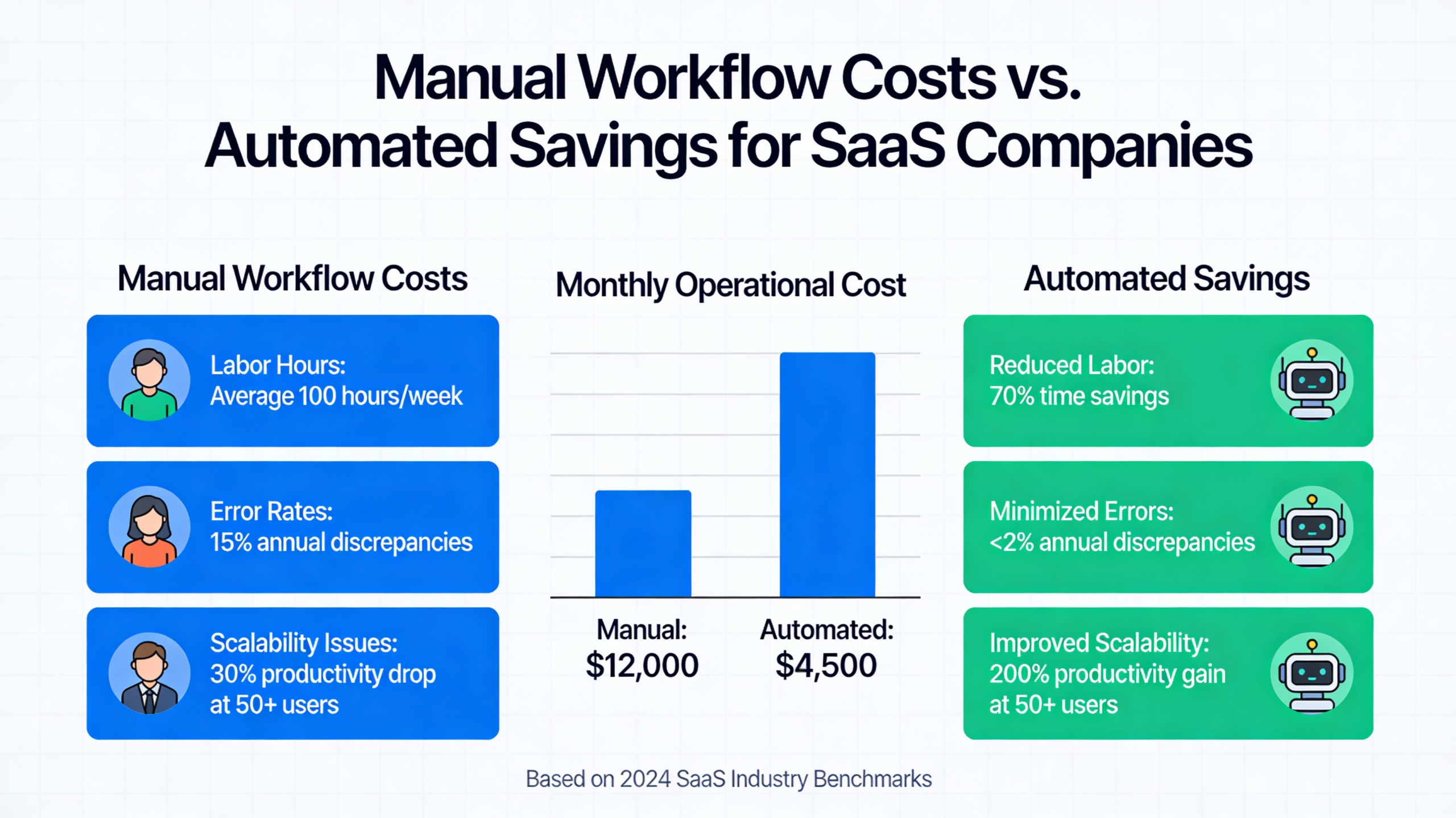
Manual workflows in a SaaS context refer to any operational process that requires human intervention to transfer data, trigger actions, or update records across systems. While these tasks may seem manageable in the early stages of a startup, they often mask significant hidden costs that drain resources as the company matures.
Labor expenses are the most obvious burden, but the real damage comes from error correction and delayed revenue. When team members spend hours on administrative data entry, they are not focusing on product innovation or customer success, creating an opportunity cost that is difficult to recover. Furthermore, manual hand-offs frequently lead to data silos and internal friction.
| Process Type | Average Time Spent (Manual) | Average Time Spent (Automated) | Efficiency Gain |
|---|---|---|---|
| Data Reconciliation | 10-15 Hours/Week | < 1 Hour/Week | 90%+ |
| User Provisioning | 30 Minutes/User | Instant | 100% |
| Reporting & Analytics | 5 Hours/Month | Real-time | 95%+ |
Understanding these costs is essential for maintaining long-term profitability. By reviewing SaaS automation best practices and consulting a SaaS benchmark report, leaders can identify where their overhead deviates from industry standards.
How Manual Processes Amplify Margin Pressure as You Grow

Diseconomies of manual effort occur when the growth of a SaaS company is met with a disproportionate increase in operational complexity. In a perfectly scalable model, margins should expand as the customer base grows; however, manual steps create a linear relationship between headcount and revenue that eats away at those expected gains.
As volume increases, the probability of human error compounds, requiring more staff solely for “clean-up” operations. This creates a cycle where more labor is hired to fix the mistakes of previous manual tasks, leading to a noticeable increase in the cost of goods sold (COGS). This operational inefficiency is often cited in Harvard Business Review articles as a primary reason for scaling plateaus.
To visualize this, consider a bar chart representing margin performance. In an automated environment, the margin percentage climbs steadily alongside revenue. In a manual environment, the margin stays flat or even dips as the “labor tax” of handling more users outweighs the incremental revenue gained from those users. Improving SaaS margins requires breaking this link between growth and manual labor.
Key Areas Where Manual Workflows Drain Profitability
Profitability leaks are rarely located in one single department; rather, they are distributed across the entire customer lifecycle. Identifying these specific points of friction is the first step toward reclaiming your margins and ensuring every dollar of revenue is as profitable as possible.
- Onboarding bottlenecks: High-touch manual setups that slow down the time-to-value for new customers.
- Billing friction: Invoicing and reconciliation processes that rely on spreadsheets and manual verification.
- Support overhead: High volumes of repetitive tickets that require manual routing and basic troubleshooting.
Customer Onboarding
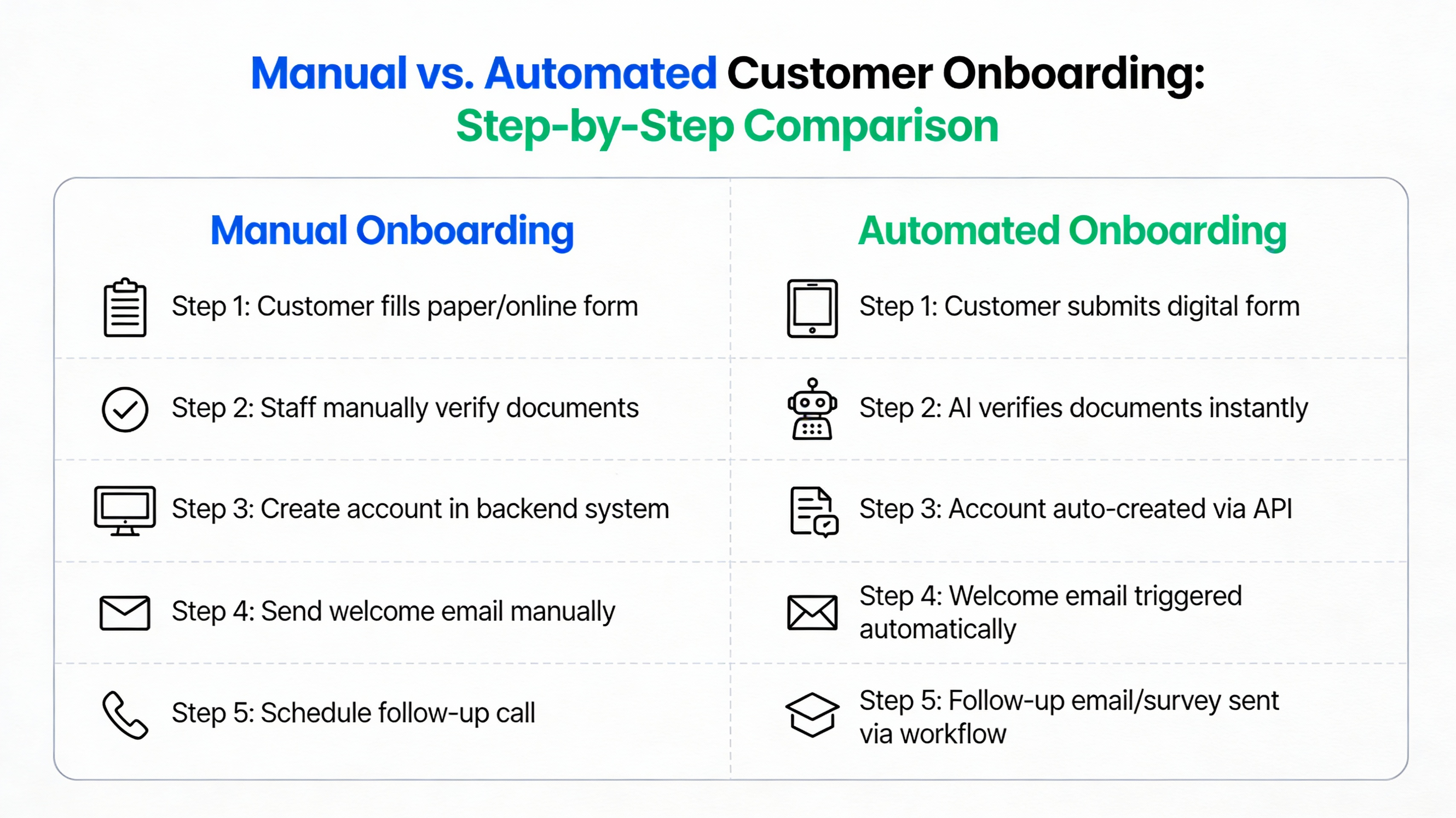
Manual data entry during the onboarding phase often leads to significant delays in product adoption. When a new user has to wait for a human agent to provision an account or upload a configuration file, the risk of early churn increases significantly. Errors made during this stage can haunt the customer relationship for months, requiring constant re-work by the customer success team.
“Our biggest hurdle wasn’t finding customers; it was the two weeks of manual configuration we had to do for every new sign-up. It felt like we were building a bespoke house for every user instead of a scalable software product.” — SaaS Founder
Billing & Revenue Recognition
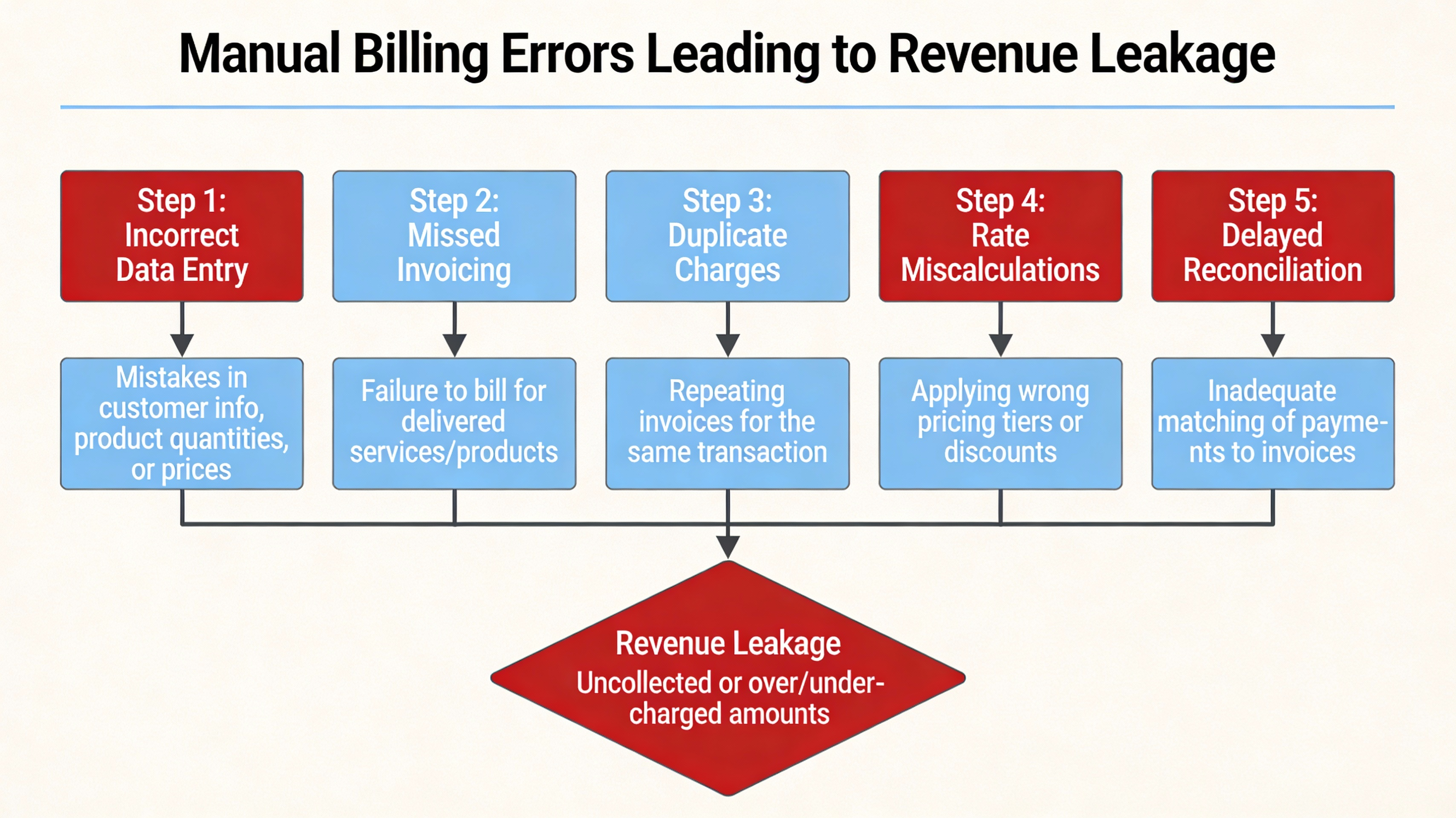
Manual invoicing creates a ripple effect of compliance risks and missed revenue opportunities. If a finance team has to manually calculate prorated charges or verify usage data, the window for billing errors opens wide. These mistakes don’t just cost money; they erode trust with the customer and increase the finance team’s overhead as they spend days on monthly reconciliation.
| Metric | Manual Billing Cycle | Automated Billing Cycle |
|---|---|---|
| Invoicing Time | 3-5 Days | Minutes |
| Error Rate | Approx. 5-10% | Near 0% |
| Revenue Leakage | Noticeable increase | Minimal |
Support & issue Resolution

Ticket triage by hand is an incredibly slow and expensive way to manage customer service. When a support lead has to read every incoming email to decide which department it belongs to, resolution times balloon. This duplicate effort often results in engineers spending time on basic issues that could have been resolved through automated self-service or smarter routing logic.
A common scenario involves a support team reaching a “breaking point” where they can no longer keep up with the volume of simple password resets and basic queries. Without automation, the only solution is to hire more agents, which further compresses the margins and does nothing to solve the underlying inefficiency of the support flow.
The Business Impact: From Reduced Margins to Stunted Growth
Strategic outcomes are directly influenced by the operational health of the organization. When margins are suppressed by manual labor, a company has less capital available to reinvest in Research and Development (R&D), key leadership hires, or aggressive marketing campaigns. This creates a ceiling on growth that competitors with automated stacks can easily bypass.
This creates a negative feedback loop: higher operational costs lead to slower growth, which creates more pressure to handle things manually “just for now” to save on software costs, which in turn drives costs even higher. According to McKinsey articles on scaling SaaS operations, the most successful companies are those that prioritize operational excellence as a core growth lever rather than a secondary concern.
The visual representation of this loop shows how manual pressure leads to employee burnout, which leads to higher turnover and further training costs. Breaking this cycle requires a fundamental shift in how the leadership team views the ROI of internal tooling and workflow optimization.
Automating for Margin Recovery: Strategic Steps
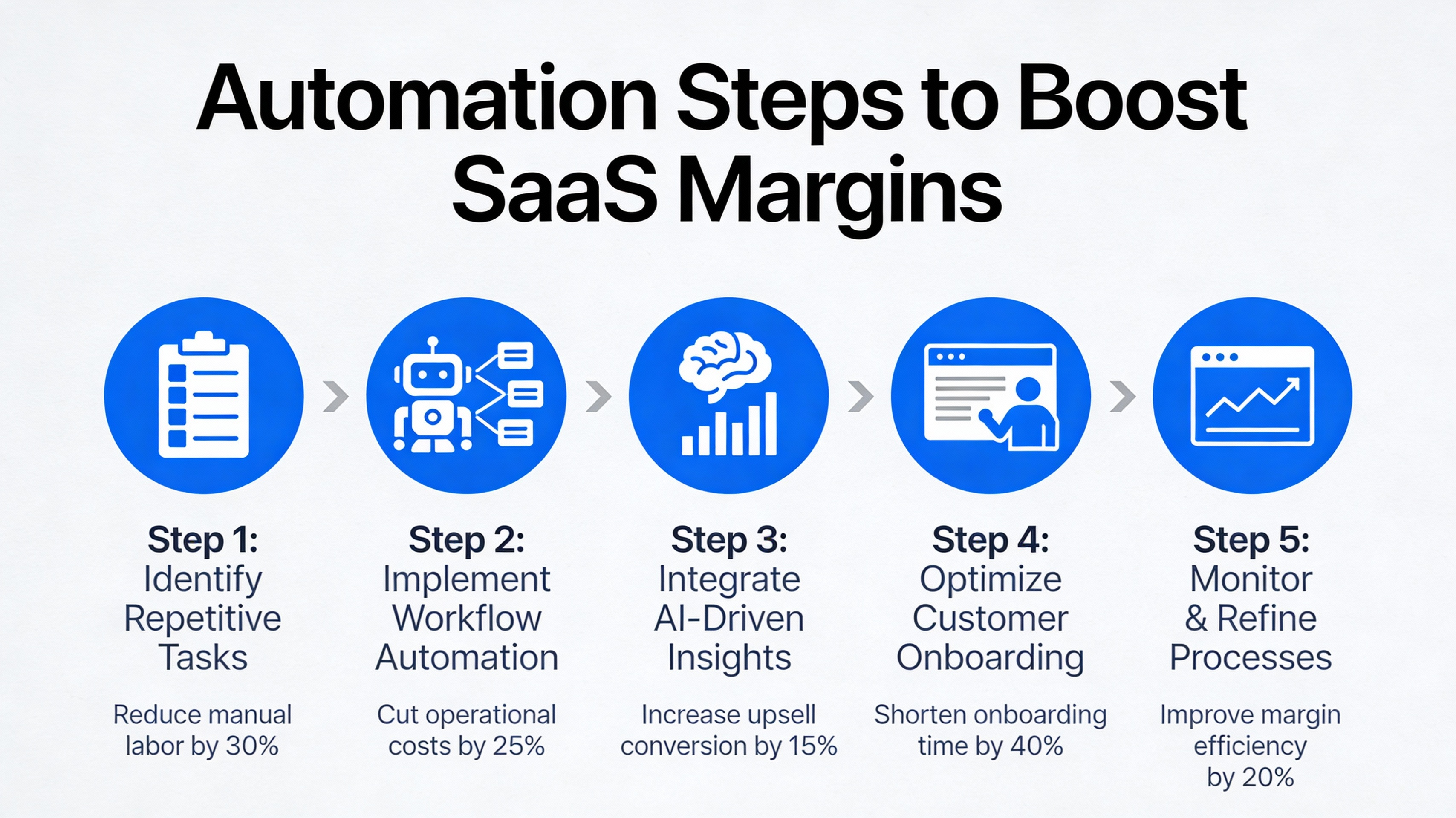
The ROI of automation is often realized much faster than founders anticipate. By shifting from human-dependent tasks to software-driven workflows, a SaaS company can achieve higher throughput without increasing headcount. The goal is to move the company toward a “low-touch” operational model that supports rapid scaling with consistent costs.
Taking the first step involves a cold-eyed assessment of current processes. Choosing the right automation tools is not about buying the most expensive software, but about finding the tools that integrate seamlessly with your existing stack and solve your most acute pain points first.
Prioritize High-Impact Processes
High-impact processes are those that combine a high frequency of occurrence with a high risk of error. Start by auditing your team’s weekly activities to identify which tasks consume the most “human hours.” Using a simple impact-effort matrix can help you visualize which automation projects will yield the quickest results for the least amount of engineering resources.
For example, automating a task that takes 10 hours a week but is very easy to script should be prioritized over a task that takes 2 hours but requires a complex custom integration. Focus on the “low-hanging fruit” to build momentum and prove the value of automation to the wider organization.
Choose Scalable Automation Tools
Scalable automation tools must be evaluated based on their integration ecosystem and API availability. If a tool doesn’t “talk” to the rest of your tech stack, it simply creates another manual bridge for your team to cross. Many modern SaaS companies are finding success with low-code platforms that allow non-technical staff to build their own workflow triggers.
- Check for native integrations with your CRM and Billing software.
- Ensure the pricing model scales with your usage, not just your headcount.
- Prioritize tools with robust documentation and support.
Measure ROI and Iterate
Baseline metrics must be established before any automation is implemented to accurately track progress. Without a “before” snapshot of cost per transaction and error rates, it is impossible to quantify the margin recovery achieved through your efforts. Continuous improvement is key; automation is not a “set it and forget it” project but a core part of operational maintenance.
| Metric to Track | Before Automation | Target Post-Automation | Actual Result |
|---|---|---|---|
| Cost per Account Setup | $XX.XX | $X.XX | — |
| Error-related Re-work | X Hours/Month | < 1 Hour/Month | — |
| Time to Revenue | X Days | < 1 Day | — |
Key Takeaways
Regaining your profit margins requires a disciplined approach to identifying and eliminating manual workflows. By focusing on scalability and automation, SaaS leaders can ensure their business grows more profitable as it expands, rather than more complex and expensive.
- Manual workflows create a “labor tax” that compounds with growth and suppresses profit margins.
- Onboarding, billing, and support are the most common areas where manual effort drains profitability.
- Automation breaks the link between headcount and revenue, allowing for true economies of scale.
- Success requires a strategic roadmap: prioritize high-impact tasks, use scalable tools, and measure ROI.
FAQ
Common questions about transitioning from manual to automated workflows often center on cost and the impact on the customer experience. Here are the most frequent considerations for SaaS leaders.
- Is automation expensive for early-stage SaaS?While there is an upfront cost in time and software, the long-term savings in labor and the prevention of revenue leakage usually provide a positive ROI within the first year.
- Can automation affect customer experience negatively?If done poorly, yes. However, well-designed automation usually improves the experience by providing faster response times, fewer errors, and smoother onboarding flows.
- What’s the quickest manual process to automate?User provisioning and basic notification triggers (like welcome emails or billing alerts) are typically the fastest to implement and provide immediate relief to operational teams.
For more detailed advice on implementation, see our guide on cost-effective automation for startups.
Next steps for manual workflows
Ready to reclaim your margins and build a more scalable SaaS business? The transition from manual chaos to automated efficiency starts with a clear understanding of your current operational leaks and a commitment to fixing them. Taking action today will prevent your growth from being stalled by the weight of human-dependent processes.
To begin your journey toward operational excellence, consider conducting a comprehensive internal workflow audit. This will allow you to pinpoint the exact tasks that are hurting your profitability the most. You can also reach out for a consultation to see how professional automation strategies can be applied to your specific business model.