
Why Automation Levels the Playing Field
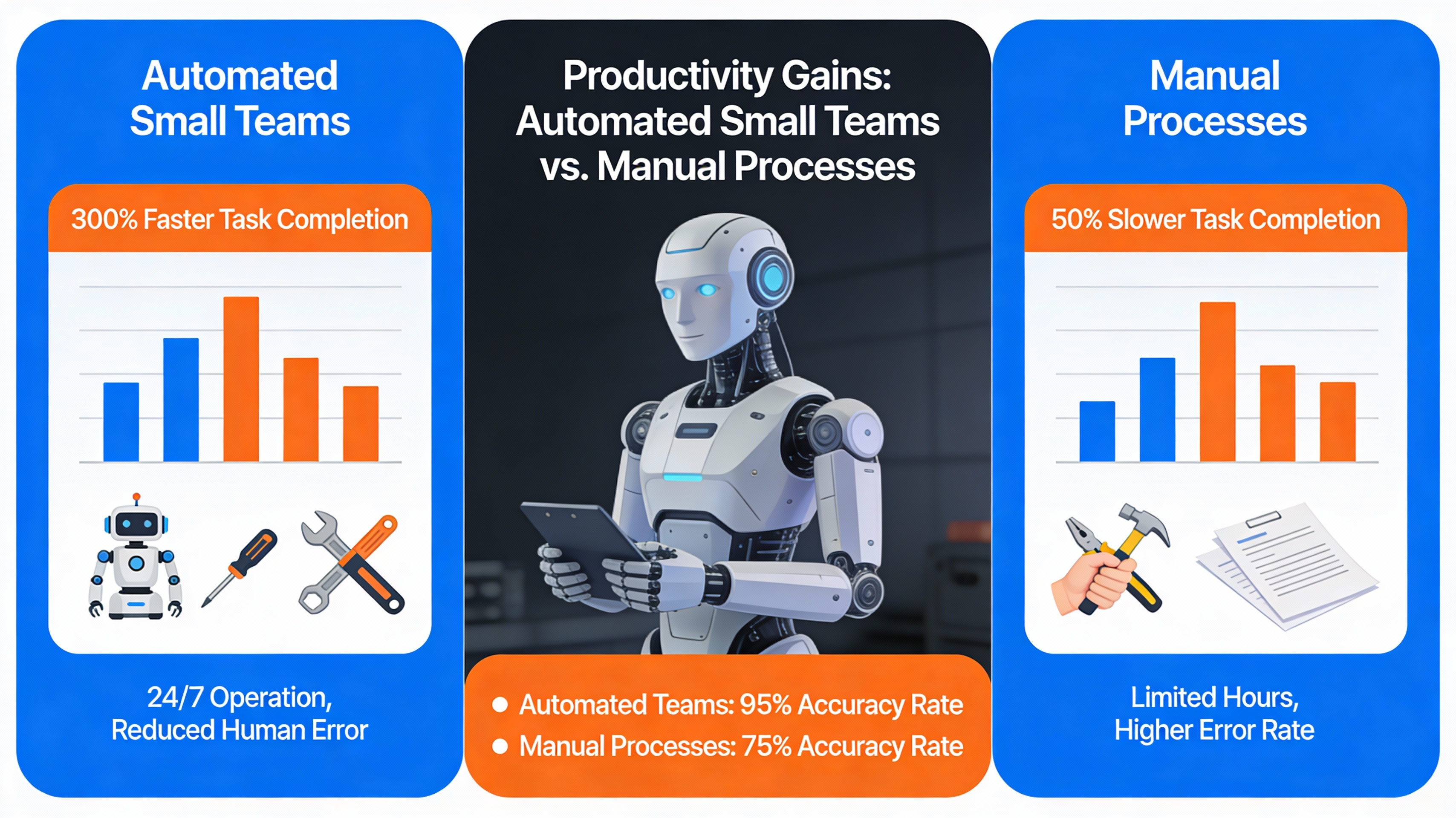
Strategic automation allows small teams to compete with large firms by streamlining complex processes and reducing manual labor. By shifting focus from administrative maintenance to high-level strategy, organizations can optimize existing resources without the need for massive headcount expansion. This narrowed gap in speed and accuracy often defines the difference between growth and stagnation.
Cost vs. Capability Comparison
Resource allocation becomes much more efficient when technology handles repetitive tasks. Small businesses can operate with lower overhead costs while maintaining the same output quality as corporations with significantly larger departments. This efficiency allows for a more agile response to market changes and customer needs.
Real-World Success Snapshots
Operational speed is significantly increased when software handles the heavy lifting of data management and communications. Small firms that adopt these workflows report fewer human errors and faster turnaround times for client deliverables. These gains prove that size disadvantage can be offset by a smart technical foundation.
| Process Type | Manual Effort | Automated Effort |
|---|---|---|
| Data Entry | Approximately 4 hours daily | Instant synchronization |
| Reporting | Manual monthly consolidation | Real-time dashboard updates |
| Customer Follow-up | Daily manual emails | Triggered workflow sequences |
Identifying Repetitive Tasks in Small Teams

Workflow auditing is the essential first step for any team looking to pinpoint exactly where time is being lost to repetition. Analyzing hidden inefficiencies in sales, marketing, and general operations helps leaders identify which tasks are the best candidates for removal from the human workload. This process requires an honest assessment of daily habits across every team function.
Common Pain Points Across Functions
Functional bottlenecks often occur in areas where data must be moved between different software platforms manually. Sales teams frequently struggle with lead notifications, while marketing departments may lose hours to social media scheduling and content distribution. Recognizing these specific pain points allows for a more targeted automation strategy.
Task Mapping Worksheet
Structured assessment is made easier by using a task mapping worksheet to document every recurring action. Team leads should encourage staff to record how much time is spent on non-strategic duties each week. This documentation provides the data needed to justify the implementation of new tools.
- Sales lead notifications and routing
- Invoice generation and payment tracking
- Social media post scheduling
- Customer support ticket categorization
- Meeting scheduling and reminders
Choosing the Right Automation Tools

Tool selection involves evaluating platforms based on their ease of use, integration capabilities, and total cost for small teams. The goal is to find software that connects existing apps without requiring deep technical knowledge or a full-time developer. High ROI tools often offer tiered pricing that fits teams of 2 to 20 people perfectly.
Low-Code vs. No-Code Platforms
Platform accessibility is a major factor when choosing between no-code and low-code solutions. No-code tools allow team leads to build workflows using visual drag-and-drop interfaces, which is ideal for non-technical staff. Low-code options provide more flexibility for complex logic but may require some basic scripting knowledge.
Criteria Checklist for Small Teams
Selection criteria must include the quality of the integration ecosystem and the level of customer support provided. Small teams should prioritize tools that offer pre-built templates for common tasks like email marketing and CRM management. Testing the software with a small pilot project is the best way to ensure it fits the team’s specific needs.
| Tool | Cost Tier | Ease of Use | Integrations |
|---|---|---|---|
| Zapier | Free to Enterprise | High | 5,000+ |
| Make | Tiered Monthly | Medium | 1,000+ |
| Power Automate | License-based | Medium | Microsoft Ecosystem |
Implementing Automation: A Step-by-Step Guide
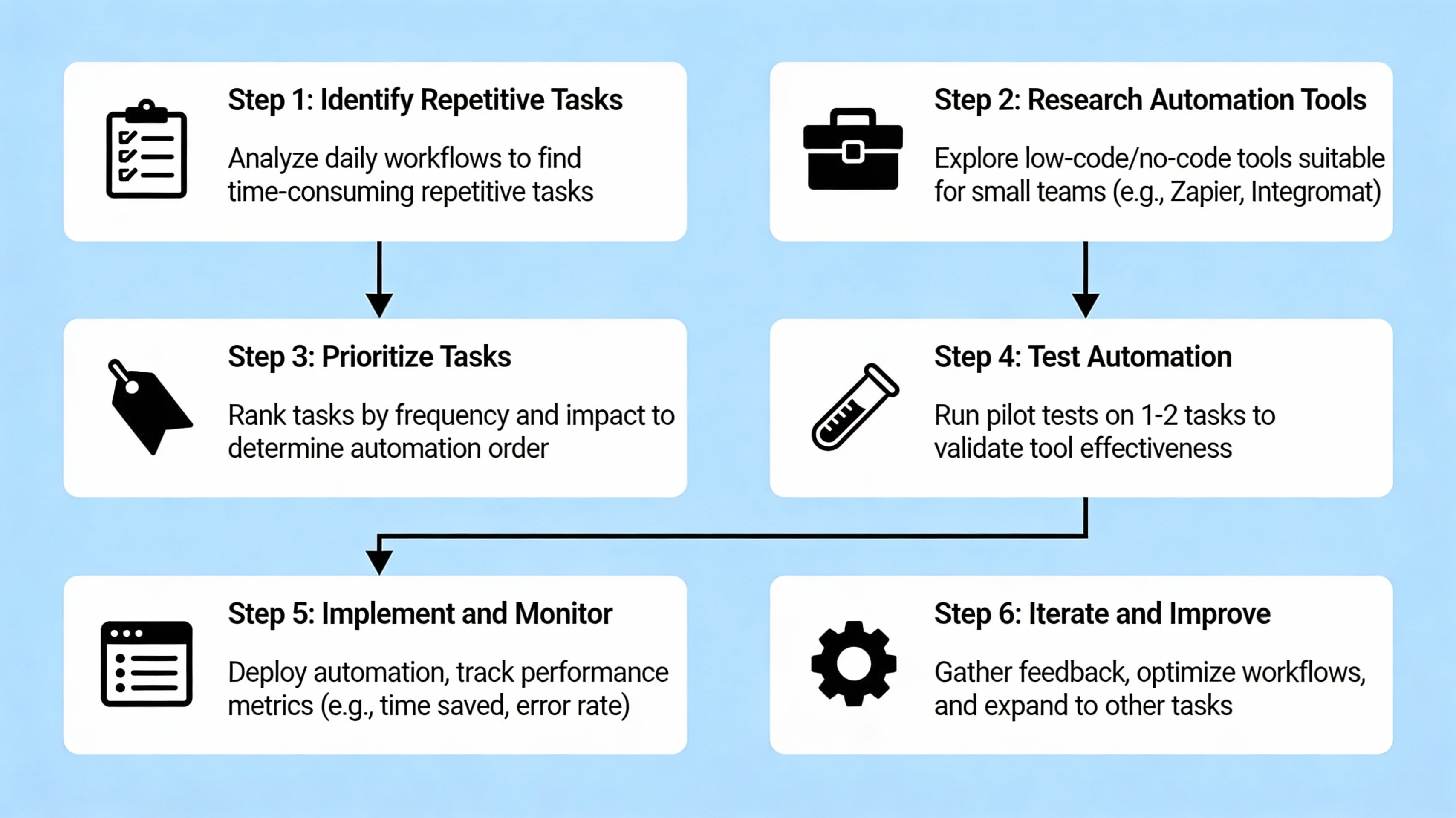
Implementation strategy begins with a single pilot project designed to deliver quick results and build team confidence. Rather than attempting to automate every department at once, focus on one high-impact workflow that is currently draining resources. This focused approach ensures that the transition is manageable and results are measurable.
Pilot Project Selection
Priority setting should focus on processes with clear, repetitive steps and a high volume of transactions. Examples include automated lead capturing or standardized internal status updates that happen daily. Selecting a project with a low margin for error and high frequency ensures the most significant early impact.
Building and Testing Workflows
Workflow construction involves mapping out the trigger, the logic, and the resulting action within your chosen platform. It is vital to test these sequences with a small group of users to identify any edge cases or errors before a full rollout. Iterative testing prevents large-scale failures that could discourage the team.
Training the Team
Knowledge sharing ensures that every team member understands how to interact with the new automated systems. Creating a simple knowledge base or documentation set helps maintain the workflows even if the primary creator leaves the company. Training reduces friction and encourages further ideas for automation from within the team.
- Select a high-impact pilot process with clear ROI.
- Map the current manual workflow and identify logic steps.
- Build the automation in a sandbox or test environment.
- Test with a small user group and iterate based on feedback.
- Document the process and conduct final team training.
Measuring Success and Scaling Automation

Performance measurement allows leadership to quantify the specific impact of automation on the business’s bottom line. By tracking how many hours are recovered and how much error rates decrease, managers can justify further investment in technology. These metrics are critical for securing stakeholder buy-in for future scaling efforts.
Key Metrics to Track
Success indicators should include time saved per task, the reduction in manual data errors, and the overall cost per transaction. Utilizing simple dashboards or even basic spreadsheets can help visualize these trends over several months. Consistent monitoring ensures that the automation continues to function as intended as the business grows.
Iterative Scaling Framework
Scaling automation should follow a structured framework where new projects are selected based on the success of previous ones. Once a pilot is successful, look for similar tasks in other departments that can benefit from the same logic. This gradual expansion helps maintain a high ROI while minimizing organizational stress.
Key Takeaways
Key action items provide a roadmap for small businesses looking to harness the power of digital efficiency. By focusing on high-frequency tasks and choosing the right no-code tools, even a small team can achieve massive operational gains. Consistency and clear documentation are the foundations of long-term success.
“Automation is not about replacing people; it is about freeing them to do the work that only humans can do.”Strategic Automation Guide
- Start with a single pilot project to prove immediate ROI.
- Focus on high-frequency, low-complexity tasks first.
- Use no-code tools to keep technical costs low.
- Document all workflows to ensure long-term sustainability.
- Measure time and cost savings to justify future scaling.
FAQ
Common questions often arise when small teams begin their digital transformation journey. Understanding the costs and requirements helps leadership move forward with confidence and clarity. Addressing these concerns early prevents friction during the implementation phase.
Do I need coding skills to start?
Most modern no-code platforms use visual builders that allow non-technical staff to create complex workflows without writing code.
What is the typical cost for a small team?
Many automation tools offer free entry-level tiers or affordable monthly subscriptions tailored for businesses with fewer than 20 users.
Can automation replace my existing staff?
Automation is typically used to reallocate staff to higher-value, strategic work by removing the burden of repetitive administrative tasks.
How long does implementation take?
A simple pilot project can often be built and tested within a few days, while more complex systems may take several weeks to fully integrate.
Next steps for small teams

Taking action is the final step in turning automation from a theoretical concept into a tangible competitive advantage. Small business owners should begin by downloading a task-mapping worksheet to perform a thorough internal audit of their daily operations. Scheduling a consultation or exploring a starter guide will provide the technical clarity needed to launch your first pilot project today.