Blog

  • How Small Teams Can Outperform Giants Through Automation

    How Small Teams Can Outperform Giants Through Automation

    Why Automation Levels the Playing Field
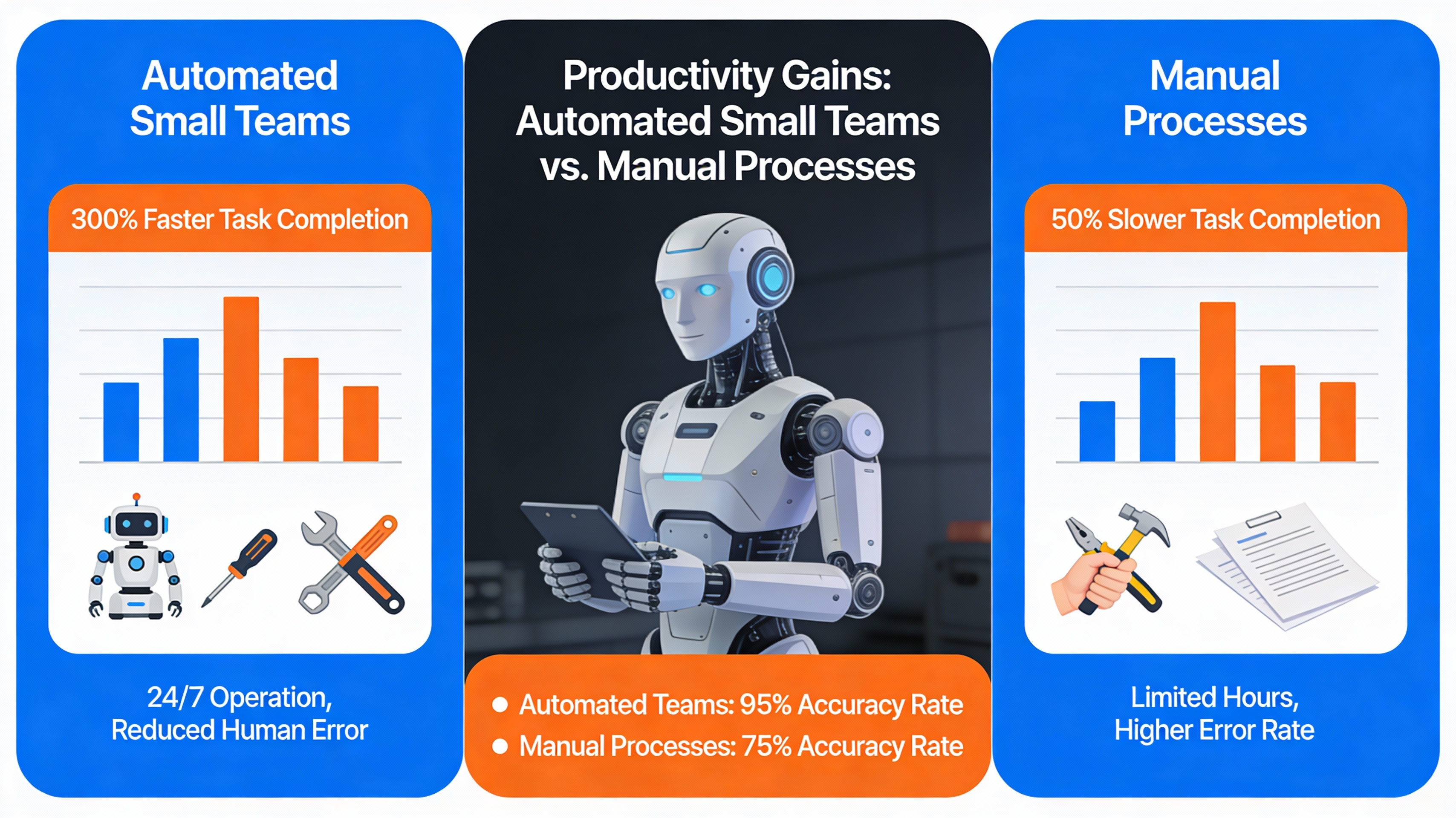
    Comparison infographic of automation benefits for small teams
    Generated by Articfly AI

    Strategic automation allows small teams to compete with large firms by streamlining complex processes and reducing manual labor. By shifting focus from administrative maintenance to high-level strategy, organizations can optimize existing resources without the need for massive headcount expansion. This narrowed gap in speed and accuracy often defines the difference between growth and stagnation.

    Cost vs. Capability Comparison

    Resource allocation becomes much more efficient when technology handles repetitive tasks. Small businesses can operate with lower overhead costs while maintaining the same output quality as corporations with significantly larger departments. This efficiency allows for a more agile response to market changes and customer needs.

    Real-World Success Snapshots

    Operational speed is significantly increased when software handles the heavy lifting of data management and communications. Small firms that adopt these workflows report fewer human errors and faster turnaround times for client deliverables. These gains prove that size disadvantage can be offset by a smart technical foundation.

    Process Type Manual Effort Automated Effort
    Data Entry Approximately 4 hours daily Instant synchronization
    Reporting Manual monthly consolidation Real-time dashboard updates
    Customer Follow-up Daily manual emails Triggered workflow sequences

    Identifying Repetitive Tasks in Small Teams

    Employee doing repetitive data entry tasks
    Photo Karola G from Pexels

    Workflow auditing is the essential first step for any team looking to pinpoint exactly where time is being lost to repetition. Analyzing hidden inefficiencies in sales, marketing, and general operations helps leaders identify which tasks are the best candidates for removal from the human workload. This process requires an honest assessment of daily habits across every team function.

    Common Pain Points Across Functions

    Functional bottlenecks often occur in areas where data must be moved between different software platforms manually. Sales teams frequently struggle with lead notifications, while marketing departments may lose hours to social media scheduling and content distribution. Recognizing these specific pain points allows for a more targeted automation strategy.

    Task Mapping Worksheet

    Structured assessment is made easier by using a task mapping worksheet to document every recurring action. Team leads should encourage staff to record how much time is spent on non-strategic duties each week. This documentation provides the data needed to justify the implementation of new tools.

    • Sales lead notifications and routing
    • Invoice generation and payment tracking
    • Social media post scheduling
    • Customer support ticket categorization
    • Meeting scheduling and reminders

    Choosing the Right Automation Tools

    Selection of popular automation tool logos
    Photo Pavel Danilyuk from Pexels

    Tool selection involves evaluating platforms based on their ease of use, integration capabilities, and total cost for small teams. The goal is to find software that connects existing apps without requiring deep technical knowledge or a full-time developer. High ROI tools often offer tiered pricing that fits teams of 2 to 20 people perfectly.

    Low-Code vs. No-Code Platforms

    Platform accessibility is a major factor when choosing between no-code and low-code solutions. No-code tools allow team leads to build workflows using visual drag-and-drop interfaces, which is ideal for non-technical staff. Low-code options provide more flexibility for complex logic but may require some basic scripting knowledge.

    Criteria Checklist for Small Teams

    Selection criteria must include the quality of the integration ecosystem and the level of customer support provided. Small teams should prioritize tools that offer pre-built templates for common tasks like email marketing and CRM management. Testing the software with a small pilot project is the best way to ensure it fits the team’s specific needs.

    Tool Cost Tier Ease of Use Integrations
    Zapier Free to Enterprise High 5,000+
    Make Tiered Monthly Medium 1,000+
    Power Automate License-based Medium Microsoft Ecosystem

    Implementing Automation: A Step-by-Step Guide
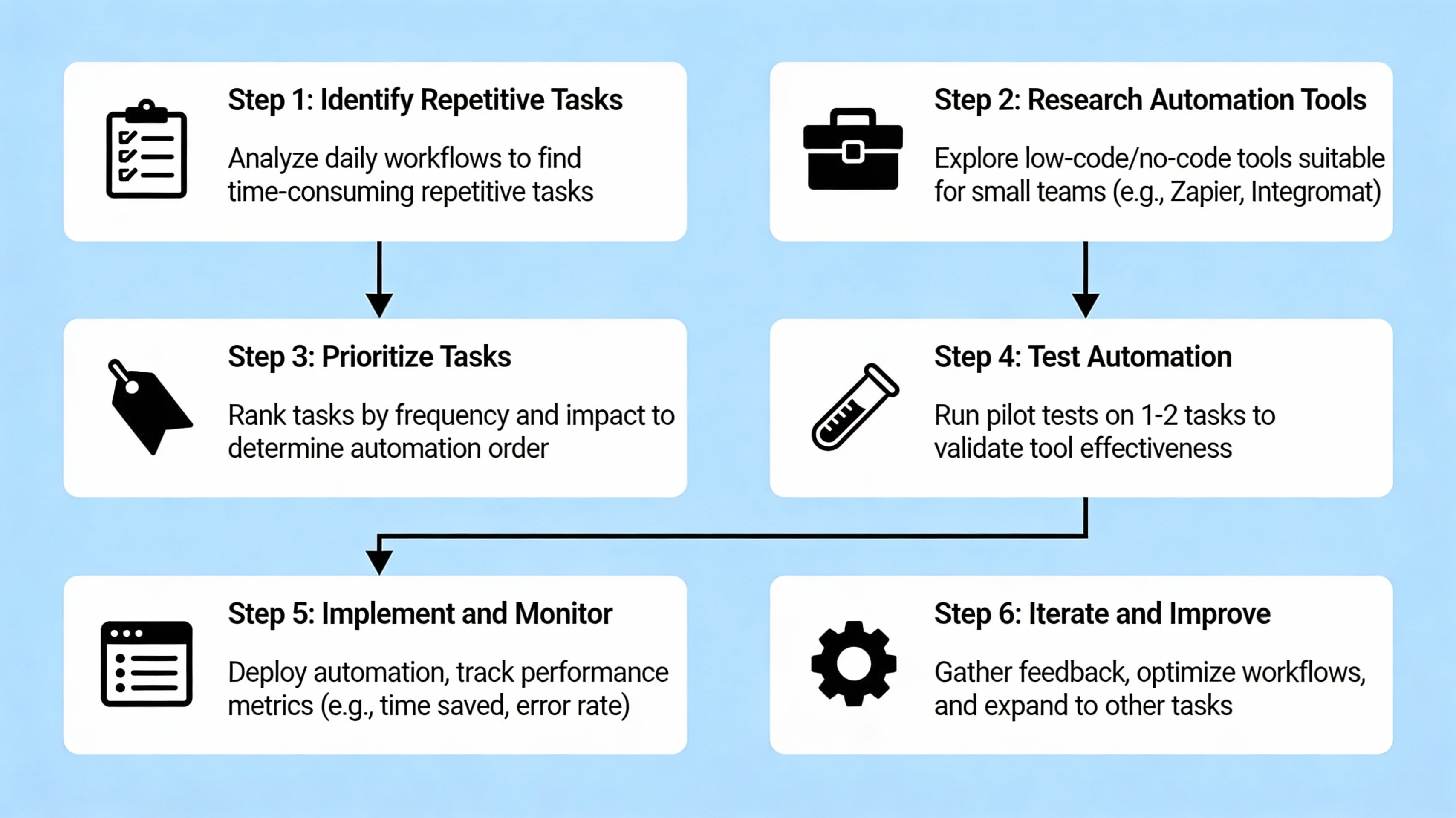
    Flowchart of automation implementation process
    Generated by Articfly AI

    Implementation strategy begins with a single pilot project designed to deliver quick results and build team confidence. Rather than attempting to automate every department at once, focus on one high-impact workflow that is currently draining resources. This focused approach ensures that the transition is manageable and results are measurable.

    Pilot Project Selection

    Priority setting should focus on processes with clear, repetitive steps and a high volume of transactions. Examples include automated lead capturing or standardized internal status updates that happen daily. Selecting a project with a low margin for error and high frequency ensures the most significant early impact.

    Building and Testing Workflows

    Workflow construction involves mapping out the trigger, the logic, and the resulting action within your chosen platform. It is vital to test these sequences with a small group of users to identify any edge cases or errors before a full rollout. Iterative testing prevents large-scale failures that could discourage the team.

    Training the Team

    Knowledge sharing ensures that every team member understands how to interact with the new automated systems. Creating a simple knowledge base or documentation set helps maintain the workflows even if the primary creator leaves the company. Training reduces friction and encourages further ideas for automation from within the team.

    1. Select a high-impact pilot process with clear ROI.
    2. Map the current manual workflow and identify logic steps.
    3. Build the automation in a sandbox or test environment.
    4. Test with a small user group and iterate based on feedback.
    5. Document the process and conduct final team training.

    Measuring Success and Scaling Automation

    Chart illustrating efficiency improvements post-automation
    Photo Lukas from Pexels

    Performance measurement allows leadership to quantify the specific impact of automation on the business’s bottom line. By tracking how many hours are recovered and how much error rates decrease, managers can justify further investment in technology. These metrics are critical for securing stakeholder buy-in for future scaling efforts.

    Key Metrics to Track

    Success indicators should include time saved per task, the reduction in manual data errors, and the overall cost per transaction. Utilizing simple dashboards or even basic spreadsheets can help visualize these trends over several months. Consistent monitoring ensures that the automation continues to function as intended as the business grows.

    Iterative Scaling Framework

    Scaling automation should follow a structured framework where new projects are selected based on the success of previous ones. Once a pilot is successful, look for similar tasks in other departments that can benefit from the same logic. This gradual expansion helps maintain a high ROI while minimizing organizational stress.

    Key Takeaways

    Key action items provide a roadmap for small businesses looking to harness the power of digital efficiency. By focusing on high-frequency tasks and choosing the right no-code tools, even a small team can achieve massive operational gains. Consistency and clear documentation are the foundations of long-term success.

    “Automation is not about replacing people; it is about freeing them to do the work that only humans can do.”Strategic Automation Guide

    • Start with a single pilot project to prove immediate ROI.
    • Focus on high-frequency, low-complexity tasks first.
    • Use no-code tools to keep technical costs low.
    • Document all workflows to ensure long-term sustainability.
    • Measure time and cost savings to justify future scaling.

    FAQ

    Common questions often arise when small teams begin their digital transformation journey. Understanding the costs and requirements helps leadership move forward with confidence and clarity. Addressing these concerns early prevents friction during the implementation phase.

    Do I need coding skills to start?

    Most modern no-code platforms use visual builders that allow non-technical staff to create complex workflows without writing code.

    What is the typical cost for a small team?

    Many automation tools offer free entry-level tiers or affordable monthly subscriptions tailored for businesses with fewer than 20 users.

    Can automation replace my existing staff?

    Automation is typically used to reallocate staff to higher-value, strategic work by removing the burden of repetitive administrative tasks.

    How long does implementation take?

    A simple pilot project can often be built and tested within a few days, while more complex systems may take several weeks to fully integrate.

    Next steps for small teams

    Call to action image encouraging starting automation
    Photo Andrea Piacquadio from Pexels

    Taking action is the final step in turning automation from a theoretical concept into a tangible competitive advantage. Small business owners should begin by downloading a task-mapping worksheet to perform a thorough internal audit of their daily operations. Scheduling a consultation or exploring a starter guide will provide the technical clarity needed to launch your first pilot project today.
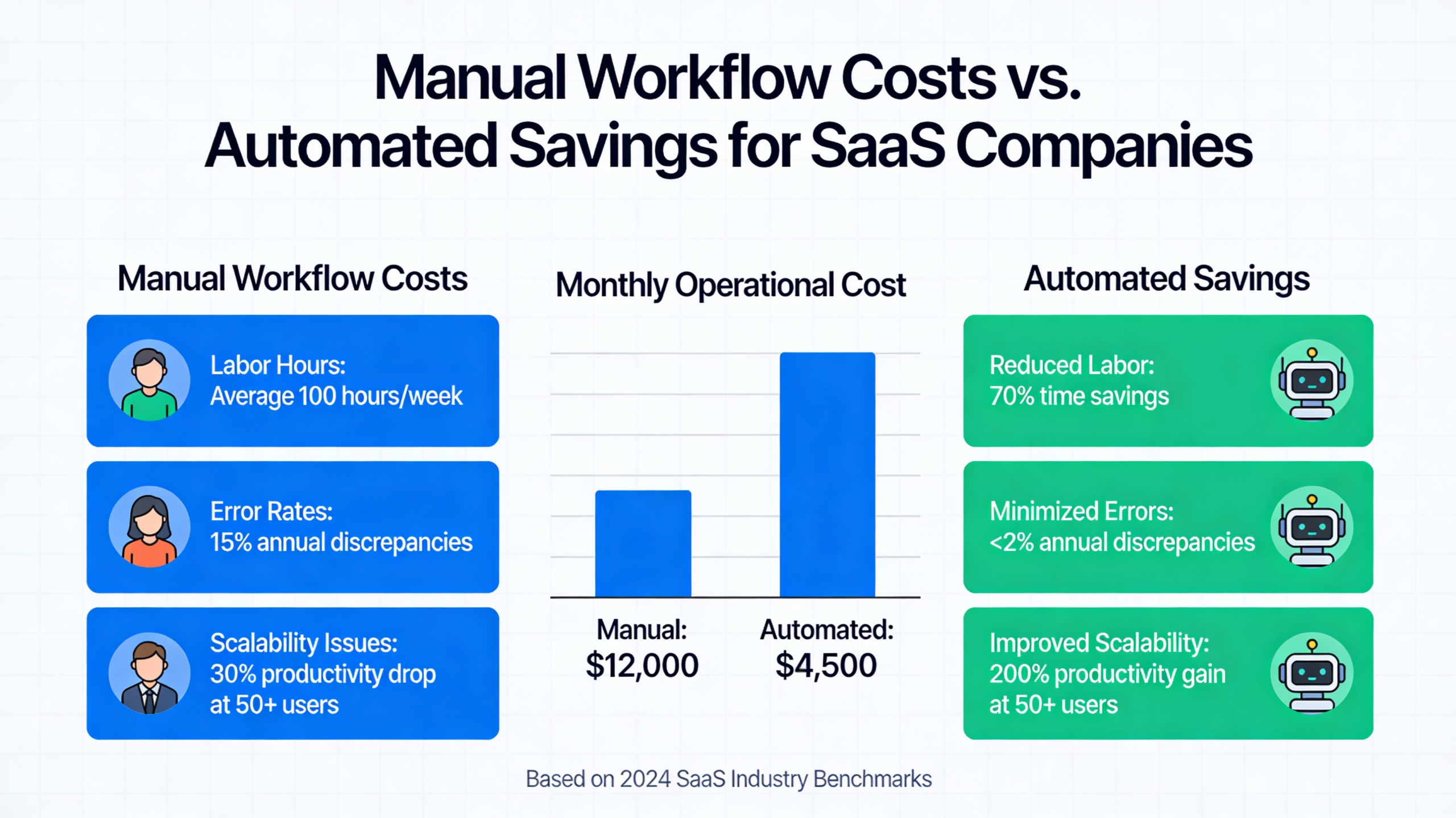

  • How Manual Workflows Erode SaaS Margins as You Scale

    How Manual Workflows Erode SaaS Margins as You Scale

    The Hidden Cost of Manual Workflows in SaaS

    Employee manually entering data, illustrating hidden workflow costs
    Photo Andrea Piacquadio from Pexels

    Manual workflows in a SaaS context refer to any operational process that requires human intervention to transfer data, trigger actions, or update records across systems. While these tasks may seem manageable in the early stages of a startup, they often mask significant hidden costs that drain resources as the company matures.

    Labor expenses are the most obvious burden, but the real damage comes from error correction and delayed revenue. When team members spend hours on administrative data entry, they are not focusing on product innovation or customer success, creating an opportunity cost that is difficult to recover. Furthermore, manual hand-offs frequently lead to data silos and internal friction.

    Process Type Average Time Spent (Manual) Average Time Spent (Automated) Efficiency Gain
    Data Reconciliation 10-15 Hours/Week < 1 Hour/Week 90%+
    User Provisioning 30 Minutes/User Instant 100%
    Reporting & Analytics 5 Hours/Month Real-time 95%+

    Understanding these costs is essential for maintaining long-term profitability. By reviewing SaaS automation best practices and consulting a SaaS benchmark report, leaders can identify where their overhead deviates from industry standards.

    How Manual Processes Amplify Margin Pressure as You Grow

    Bar chart showing margin decline due to manual processes as SaaS scales
    Photo AlphaTradeZone from Pexels

    Diseconomies of manual effort occur when the growth of a SaaS company is met with a disproportionate increase in operational complexity. In a perfectly scalable model, margins should expand as the customer base grows; however, manual steps create a linear relationship between headcount and revenue that eats away at those expected gains.

    As volume increases, the probability of human error compounds, requiring more staff solely for “clean-up” operations. This creates a cycle where more labor is hired to fix the mistakes of previous manual tasks, leading to a noticeable increase in the cost of goods sold (COGS). This operational inefficiency is often cited in Harvard Business Review articles as a primary reason for scaling plateaus.

    To visualize this, consider a bar chart representing margin performance. In an automated environment, the margin percentage climbs steadily alongside revenue. In a manual environment, the margin stays flat or even dips as the “labor tax” of handling more users outweighs the incremental revenue gained from those users. Improving SaaS margins requires breaking this link between growth and manual labor.

    Key Areas Where Manual Workflows Drain Profitability

    Profitability leaks are rarely located in one single department; rather, they are distributed across the entire customer lifecycle. Identifying these specific points of friction is the first step toward reclaiming your margins and ensuring every dollar of revenue is as profitable as possible.

    • Onboarding bottlenecks: High-touch manual setups that slow down the time-to-value for new customers.
    • Billing friction: Invoicing and reconciliation processes that rely on spreadsheets and manual verification.
    • Support overhead: High volumes of repetitive tickets that require manual routing and basic troubleshooting.

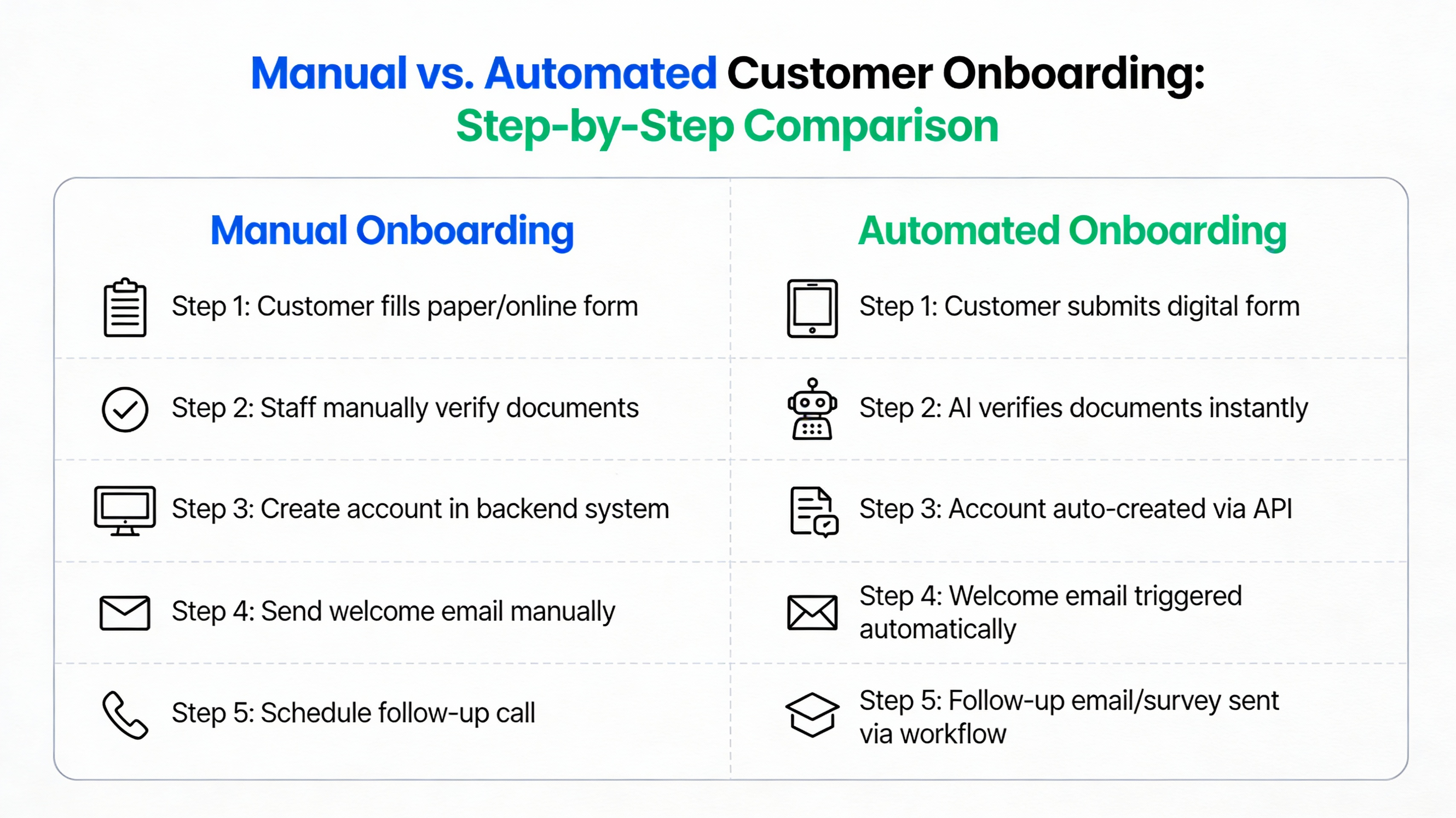
    Customer Onboarding

    Diagram comparing manual and automated onboarding processes
    Generated by Articfly AI

    Manual data entry during the onboarding phase often leads to significant delays in product adoption. When a new user has to wait for a human agent to provision an account or upload a configuration file, the risk of early churn increases significantly. Errors made during this stage can haunt the customer relationship for months, requiring constant re-work by the customer success team.

    “Our biggest hurdle wasn’t finding customers; it was the two weeks of manual configuration we had to do for every new sign-up. It felt like we were building a bespoke house for every user instead of a scalable software product.” — SaaS Founder

    Billing & Revenue Recognition

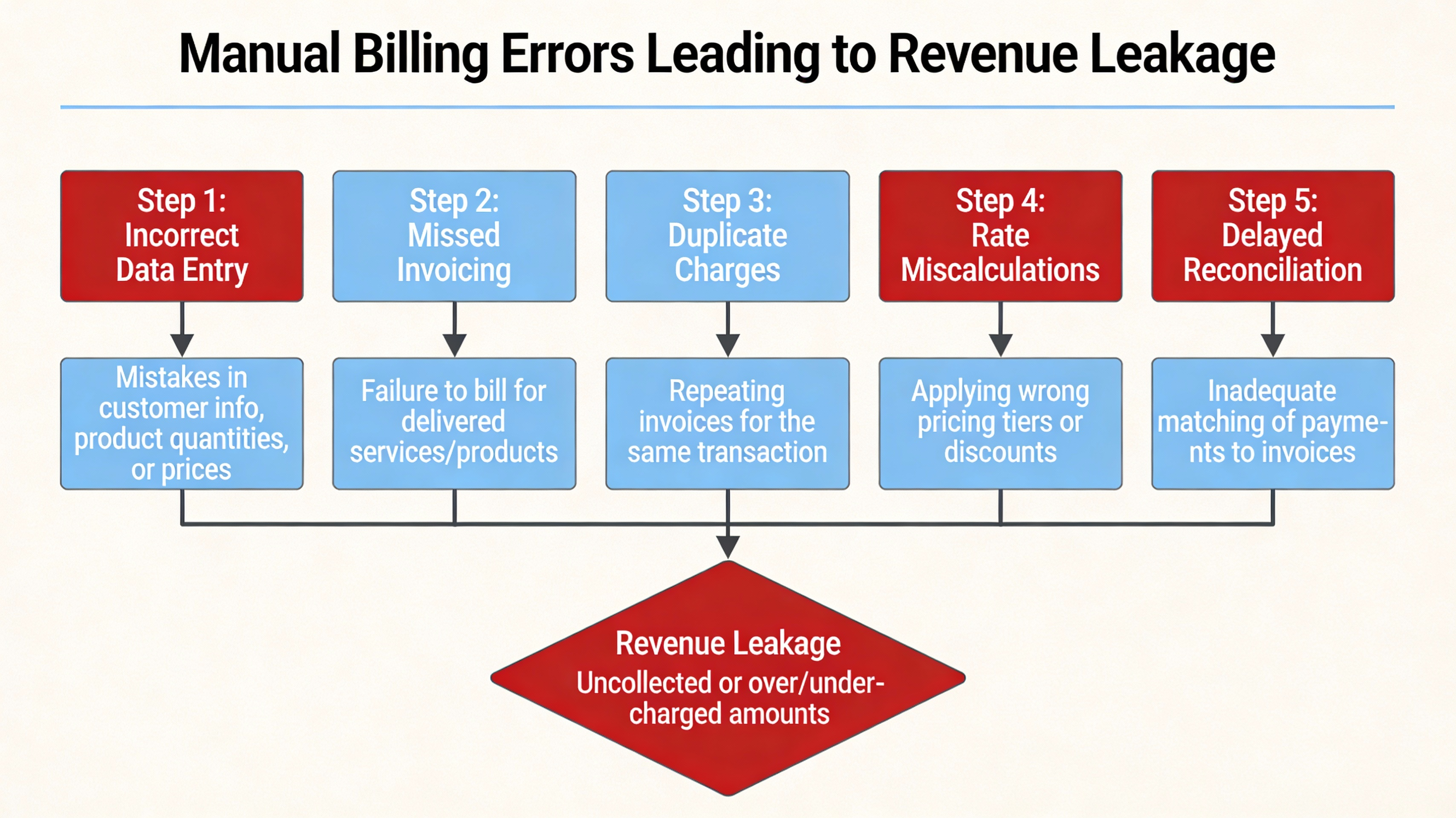
    Flowchart of manual billing errors causing revenue loss
    Generated by Articfly AI

    Manual invoicing creates a ripple effect of compliance risks and missed revenue opportunities. If a finance team has to manually calculate prorated charges or verify usage data, the window for billing errors opens wide. These mistakes don’t just cost money; they erode trust with the customer and increase the finance team’s overhead as they spend days on monthly reconciliation.

    Metric Manual Billing Cycle Automated Billing Cycle
    Invoicing Time 3-5 Days Minutes
    Error Rate Approx. 5-10% Near 0%
    Revenue Leakage Noticeable increase Minimal

    Support & issue Resolution

    Support agent manually handling tickets, illustrating inefficiency
    Photo Jep Gambardella from Pexels

    Ticket triage by hand is an incredibly slow and expensive way to manage customer service. When a support lead has to read every incoming email to decide which department it belongs to, resolution times balloon. This duplicate effort often results in engineers spending time on basic issues that could have been resolved through automated self-service or smarter routing logic.

    A common scenario involves a support team reaching a “breaking point” where they can no longer keep up with the volume of simple password resets and basic queries. Without automation, the only solution is to hire more agents, which further compresses the margins and does nothing to solve the underlying inefficiency of the support flow.

    The Business Impact: From Reduced Margins to Stunted Growth

    Strategic outcomes are directly influenced by the operational health of the organization. When margins are suppressed by manual labor, a company has less capital available to reinvest in Research and Development (R&D), key leadership hires, or aggressive marketing campaigns. This creates a ceiling on growth that competitors with automated stacks can easily bypass.

    This creates a negative feedback loop: higher operational costs lead to slower growth, which creates more pressure to handle things manually “just for now” to save on software costs, which in turn drives costs even higher. According to McKinsey articles on scaling SaaS operations, the most successful companies are those that prioritize operational excellence as a core growth lever rather than a secondary concern.

    The visual representation of this loop shows how manual pressure leads to employee burnout, which leads to higher turnover and further training costs. Breaking this cycle requires a fundamental shift in how the leadership team views the ROI of internal tooling and workflow optimization.

    Automating for Margin Recovery: Strategic Steps

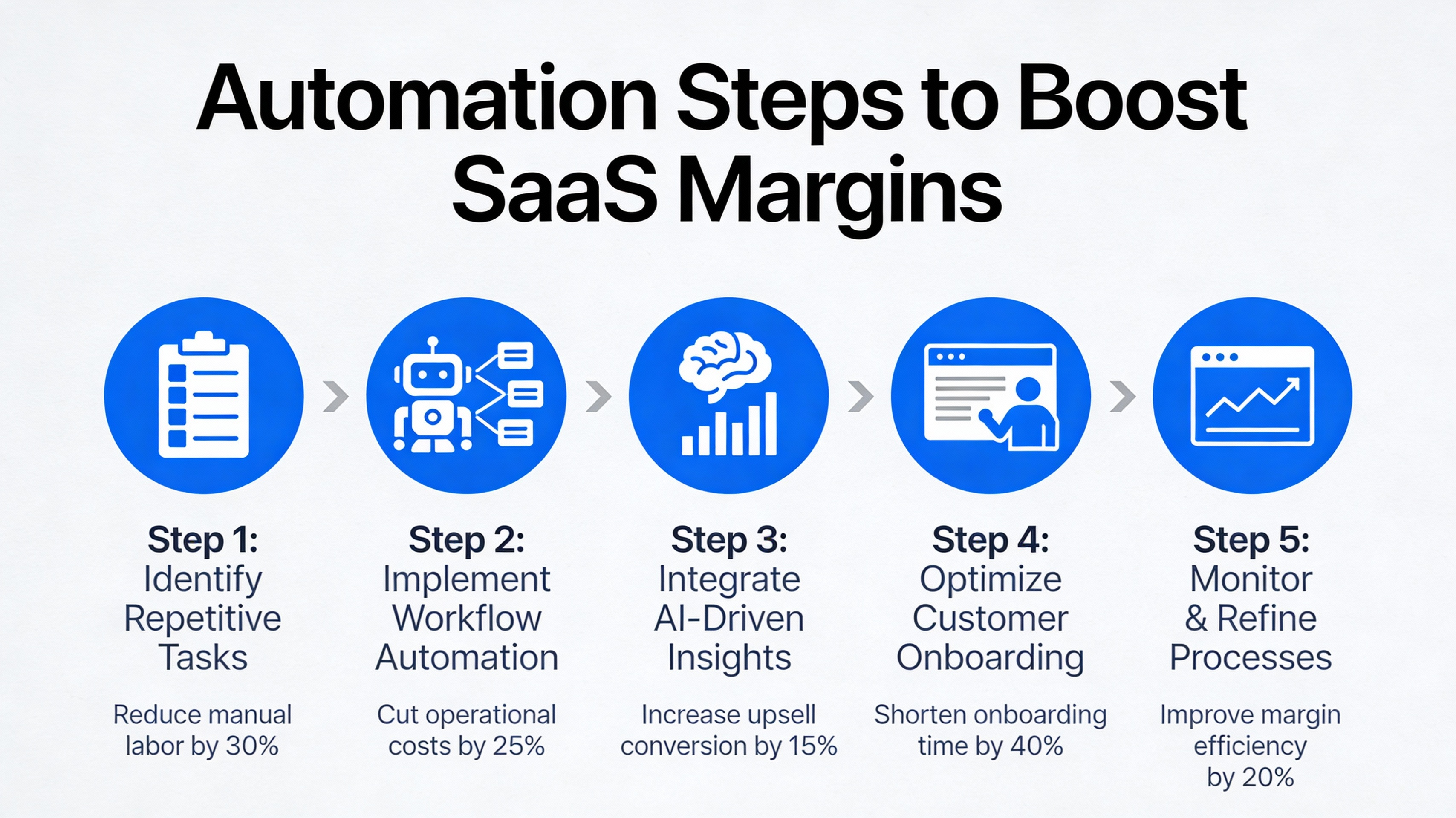
    Roadmap infographic of automation steps to improve SaaS margins
    Generated by Articfly AI

    The ROI of automation is often realized much faster than founders anticipate. By shifting from human-dependent tasks to software-driven workflows, a SaaS company can achieve higher throughput without increasing headcount. The goal is to move the company toward a “low-touch” operational model that supports rapid scaling with consistent costs.

    Taking the first step involves a cold-eyed assessment of current processes. Choosing the right automation tools is not about buying the most expensive software, but about finding the tools that integrate seamlessly with your existing stack and solve your most acute pain points first.

    Prioritize High-Impact Processes

    High-impact processes are those that combine a high frequency of occurrence with a high risk of error. Start by auditing your team’s weekly activities to identify which tasks consume the most “human hours.” Using a simple impact-effort matrix can help you visualize which automation projects will yield the quickest results for the least amount of engineering resources.

    For example, automating a task that takes 10 hours a week but is very easy to script should be prioritized over a task that takes 2 hours but requires a complex custom integration. Focus on the “low-hanging fruit” to build momentum and prove the value of automation to the wider organization.

    Choose Scalable Automation Tools

    Scalable automation tools must be evaluated based on their integration ecosystem and API availability. If a tool doesn’t “talk” to the rest of your tech stack, it simply creates another manual bridge for your team to cross. Many modern SaaS companies are finding success with low-code platforms that allow non-technical staff to build their own workflow triggers.

    • Check for native integrations with your CRM and Billing software.
    • Ensure the pricing model scales with your usage, not just your headcount.
    • Prioritize tools with robust documentation and support.

    Measure ROI and Iterate

    Baseline metrics must be established before any automation is implemented to accurately track progress. Without a “before” snapshot of cost per transaction and error rates, it is impossible to quantify the margin recovery achieved through your efforts. Continuous improvement is key; automation is not a “set it and forget it” project but a core part of operational maintenance.

    Metric to Track Before Automation Target Post-Automation Actual Result
    Cost per Account Setup $XX.XX $X.XX
    Error-related Re-work X Hours/Month < 1 Hour/Month
    Time to Revenue X Days < 1 Day

    Key Takeaways

    Regaining your profit margins requires a disciplined approach to identifying and eliminating manual workflows. By focusing on scalability and automation, SaaS leaders can ensure their business grows more profitable as it expands, rather than more complex and expensive.

    • Manual workflows create a “labor tax” that compounds with growth and suppresses profit margins.
    • Onboarding, billing, and support are the most common areas where manual effort drains profitability.
    • Automation breaks the link between headcount and revenue, allowing for true economies of scale.
    • Success requires a strategic roadmap: prioritize high-impact tasks, use scalable tools, and measure ROI.

    FAQ

    Common questions about transitioning from manual to automated workflows often center on cost and the impact on the customer experience. Here are the most frequent considerations for SaaS leaders.

    • Is automation expensive for early-stage SaaS?While there is an upfront cost in time and software, the long-term savings in labor and the prevention of revenue leakage usually provide a positive ROI within the first year.
    • Can automation affect customer experience negatively?If done poorly, yes. However, well-designed automation usually improves the experience by providing faster response times, fewer errors, and smoother onboarding flows.
    • What’s the quickest manual process to automate?User provisioning and basic notification triggers (like welcome emails or billing alerts) are typically the fastest to implement and provide immediate relief to operational teams.

    For more detailed advice on implementation, see our guide on cost-effective automation for startups.

    Next steps for manual workflows

    Ready to reclaim your margins and build a more scalable SaaS business? The transition from manual chaos to automated efficiency starts with a clear understanding of your current operational leaks and a commitment to fixing them. Taking action today will prevent your growth from being stalled by the weight of human-dependent processes.

    To begin your journey toward operational excellence, consider conducting a comprehensive internal workflow audit. This will allow you to pinpoint the exact tasks that are hurting your profitability the most. You can also reach out for a consultation to see how professional automation strategies can be applied to your specific business model.

  • Dlaczego siłownia jest bezpieczna w 1. tygodniu stycznia?

    Dlaczego siłownia jest bezpieczna w 1. tygodniu stycznia?

    Dlaczego siłownia jest mniej zatłoczona w pierwszym tygodniu stycznia?

    Wnętrze siłowni z małą liczbą osób w styczniu
    Photo Tima Miroshnichenko from Pexels

    Mniejsza gęstość osób w klubach fitness w pierwszym tygodniu stycznia jest zjawiskiem, które zaskakuje wielu początkujących. Choć przyjęło się uważać, że nowy rok to moment oblężenia siłowni, faktyczna frekwencja w pierwszych siedmiu dniach bywa niższa ze względu na okres poświątecznej regeneracji. Dzięki temu użytkownicy mogą cieszyć się większą przestrzenią i swobodniejszym dostępem do urządzeń.

    Mniejsza liczba ćwiczących bezpośrednio przekłada się na łatwiejsze zachowanie dystansu społecznego. Skróceniu ulega również czas oczekiwania na wolne ciężary czy maszyny cardio, co pozwala na płynniejszy i szybszy trening. Jest to idealny moment dla osób, które cenią sobie spokój i chcą uniknąć tłumów typowych dla końcówki stycznia.

    Okres czasu Poziom obłożenia Dostępność sprzętu
    20–31 grudnia Średni Wysoka
    1–7 stycznia Niski Bardzo wysoka
    Po 15 stycznia Wysoki Ograniczona

    Zwiększone standardy higieny i bezpieczeństwa w siłowni

    Stacja dezynfekcji w siłowni
    Photo Stacey Koenitz from Pexels

    Wysokie wymogi sanitarne stały się stałym elementem funkcjonowania nowoczesnych obiektów sportowych. Siłownie wdrożyły zaawansowane protokoły czyszczenia, które obejmują nie tylko regularną dezynfekcję powierzchni płaskich, ale również modernizację systemów wentylacyjnych. Dzięki wymianie filtrów powietrza i monitorowaniu przepływu, środowisko zamknięte staje się znacznie bardziej przyjazne dla zdrowia.

    Kluby fitness udostępniają liczne stacje z płynem dezynfekującym, które są strategicznie rozmieszczone w każdej strefie treningowej. Obsługa regularnie sprawdza stan czystości maszyn, używając do tego atestowanych środków o szerokim spektrum działania. Troska o higienę wspólną buduje zaufanie i pozwala skupić się wyłącznie na celach sylwetkowych.

    • Obowiązkowe punkty dezynfekcji rąk przy wejściu i w strefach ćwiczeń.
    • Częsta dezynfekcja urządzeń zgodnie z ustalonym harmonogramem.
    • Zmodernizowane systemy wentylacyjne zapewniające świeże powietrze.
    • Regularne kontrole jakości powietrza w godzinach szczytu.

    Noworoczne promocje i dodatkowa motywacja

    Plakat z noworoczną promocją w siłowni
    Photo Max Fischer from Pexels

    Atrakcyjne oferty startowe w styczniu są projektowane tak, aby promować nie tylko regularność, ale i bezpieczeństwo. Wiele klubów oferuje darmowe zajęcia wprowadzające z ograniczoną liczbą uczestników, co pozwala na naukę poprawnej techniki pod okiem profesjonalisty. Takie podejście minimalizuje ryzyko kontuzji i ułatwia aklimatyzację w nowym miejscu.

    Niektóre siłownie wprowadzają systemy motywacyjne dla osób przestrzegających zasad regulaminu i higieny, oferując na przykład zniżki na kolejne miesiące członkostwa. Sesje z trenerem personalnym w promocyjnych cenach pomagają ułożyć bezpieczny plan treningowy dostosowany do indywidualnych możliwości. To świetna okazja, by zacząć ćwiczyć mądrze i pod nadzorem ekspertów.

    Naszym priorytetem w nowym roku jest stworzenie warunków, w których każdy czuje się bezpiecznie. Promocje mają na celu zachęcenie do mądrego startu, a nie tylko wypełnienie sali po brzegi.

    Praktyczne wskazówki na bezpieczny trening w styczniu

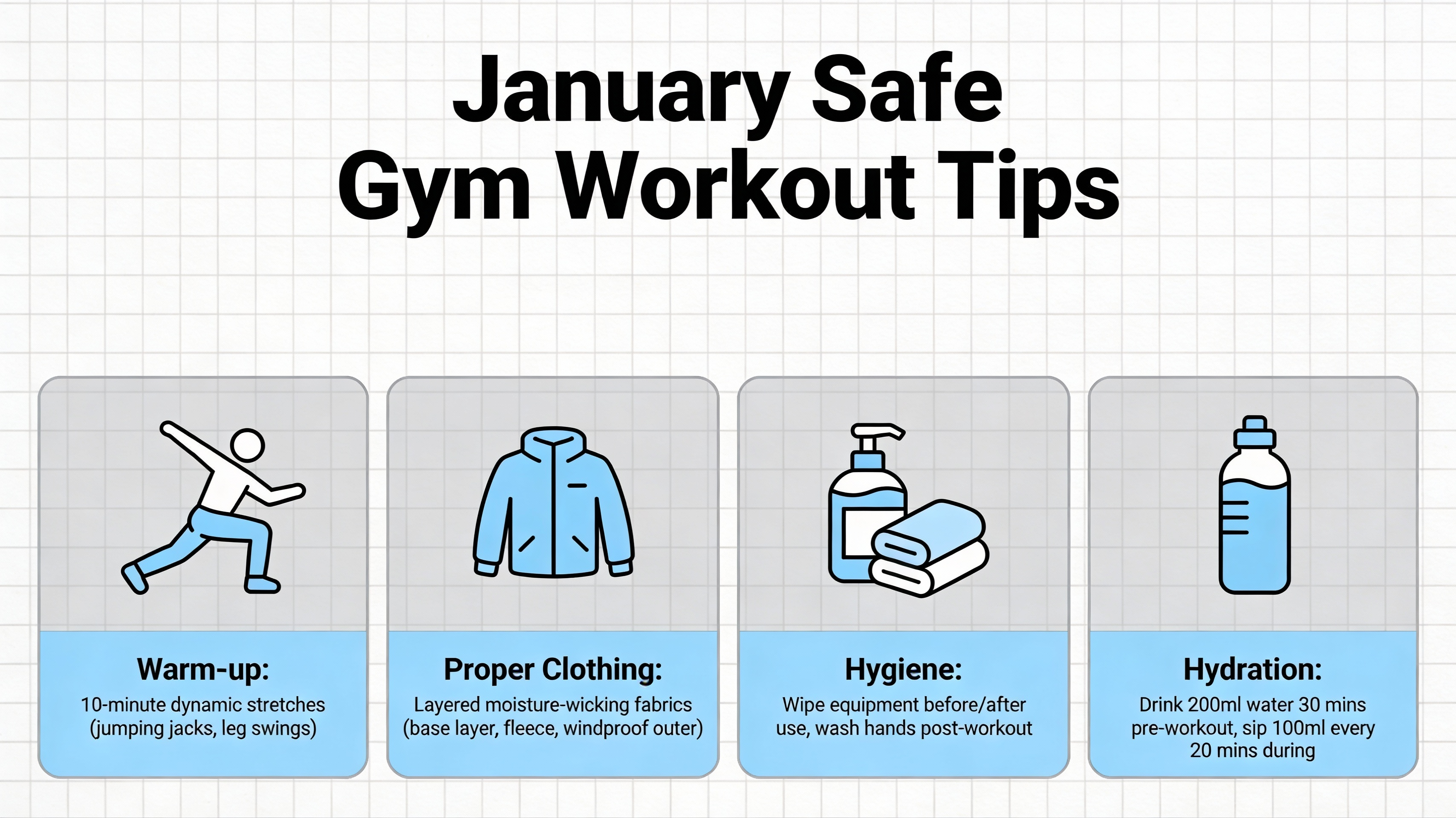
    Infografika z poradami na bezpieczny trening w styczniu
    Generated by Articfly AI

    Świadome podejście do ćwiczeń w okresie zimowym wymaga uwzględnienia różnic temperatur oraz specyfiki otoczenia. Ważne jest, aby ubierać się warstwowo, co pozwala na stopniowe przyzwyczajanie organizmu do wysiłku i zapobiega wychłodzeniu po wyjściu z budynku. Prawidłowa rozgrzewka wewnątrz siłowni jest kluczowa dla ochrony stawów przed urazami w chłodne dni.

    Podczas treningu należy bezwzględnie korzystać z własnego ręcznika i przecierać sprzęt każdorazowo przed oraz po użyciu. Zachowanie dystansu co najmniej 1,5 metra od innych ćwiczących jest możliwe dzięki mniejszemu obłożeniu sali w pierwszym tygodniu stycznia. Stałe nawadnianie organizmu oraz monitorowanie temperatury ciała pozwala utrzymać wysoką wydajność przez cały czas trwania sesji.

    Kluczowe wnioski

    Główne aspekty bezpiecznego treningu w nowym roku skupiają się na wykorzystaniu mniejszego ruchu w klubach oraz wysokich standardów sanitarnych. Wybór pierwszego tygodnia stycznia na powrót do aktywności to strategiczna decyzja dla każdego, kto obawia się tłumów. Przestrzeganie prostych zasad higieny i korzystanie z profesjonalnego wsparcia znacząco podnosi komfort ćwiczeń.

    1. Wykorzystaj niski poziom obłożenia siłowni w dniach 1–7 stycznia.
    2. Stosuj się do nowych procedur dezynfekcji dostępnych w obiekcie.
    3. Korzystaj z promocji na zajęcia z trenerem, aby zadbać o technikę.
    4. Pamiętaj o dystansie społecznym i własnym ręczniku treningowym.
    5. Zadbaj o ubiór warstwowy, aby chronić organizm przed zmianami temperatur.

    FAQ

    Czy mogę ćwiczyć, jeśli mam objawy przeziębienia?

    W przypadku wystąpienia jakichkolwiek objawów infekcji zaleca się pozostanie w domu dla bezpieczeństwa własnego oraz innych klubowiczów. Powrót do treningów powinien nastąpić dopiero po całkowitym ustąpieniu symptomów.

    Jakie środki dezynfekujące są używane w siłowni?

    Kluby fitness stosują zazwyczaj atestowane preparaty wirusobójcze i bakteriobójcze, które są bezpieczne dla skóry, a jednocześnie skutecznie neutralizują drobnoustroje na powierzchniach maszyn.

    Czy promocje noworoczne ograniczają liczbę uczestników?

    Wiele nowoczesnych promocji obejmuje limity miejsc na zajęcia grupowe, co ma na celu zapewnienie każdemu uczestnikowi odpowiedniej przestrzeni do bezpiecznego wykonywania ćwiczeń.

    Czy siłownia zapewnia kontrolę temperatury w styczniu?

    Tak, systemy klimatyzacji i wentylacji są konfigurowane tak, aby utrzymać optymalną temperaturę do ćwiczeń, niezależnie od warunków atmosferycznych panujących na zewnątrz.

    Czy mogę przyprowadzić gościa w czasie promocji?

    Większość klubów oferuje taką możliwość, jednak często wymagana jest wcześniejsza rezerwacja terminu dla gościa, aby uniknąć przekroczenia limitów osób w danej strefie.

    Następne kroki dla bezpiecznego treningu

    Zarezerwuj bezpłatne zajęcia próbne przez system rezerwacji, aby sprawdzić warunki panujące w naszym klubie. Możesz również pobrać PDF z listą kontrolną bezpiecznego treningu w styczniu, która pomoże Ci przygotować się do pierwszej wizyty. Zachęcamy także do zapisania się do naszego newslettera, aby otrzymywać bieżące informacje o standardach bezpieczeństwa i nowych ofertach.

  • Hello world!

    Welcome to WordPress. This is your first post. Edit or delete it, then start writing!